XaGui Docs
Intro

Quick start

1. Create an instance of the XaGUI library in onEnable() method of your plugin

Java code
@Override
public void onEnable() {
    XaGui xaGui = new XaGui(this);
}
Kotlin code
override fun onEnable() {
    val xaGui = XaGui(this)
}

2. Creating a single page GUI with 6 rows

Java code
GuiMenu gui = xaGui.createMenu("&7GUI TITLE", 6);
 
gui.fillBorder();
 
gui.addCloseButton();
 
gui.setOnOpen((event) -> {
    event.getPlayer().sendMessage("You opened the GUI!");
});
 
gui.open(player);
Kotlin code
val gui = xaGui.createMenu("&7GUI TITLE", 6)
gui.fillBorder()
 
gui.addCloseButton();
 
gui.setOnOpen {
    it.player.sendMessage("Gui opened")
}
 
gui.open(player)

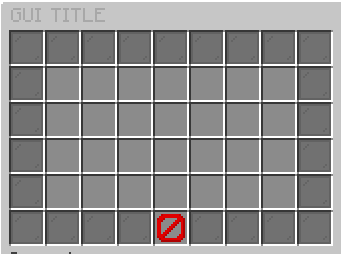
This is the result:


For bigger example, you can visit this project

Rest of the documentation will be in Java, hope that you can convert it to Kotlin easily.

On this page